

I have set up three Raspberry Pi Zero Ws, one Witty Pi 3, one Witty Pi 3 Mini, and one Witty Pi 4. All three Raspberry Pi Zero Ws are running Linux 6.12 Trixie.
The default state when powered is set to ON.
The good news is Witty Pi 4 is running without errors.
The two Witty Pi 3s cause problems with the same Schedule.
After powering on, the red and white LEDs remain lit, indicating a constant 5V output. Manually pressing the power on/off switch has no effect. Witty Pi 3 seems to be blocked.
But all scripts in /wittypi can be started via SSH without errors.
Is there a timing-problem with gpio-4 ? Should I reinstall Bullseye or Bookworm?
Thanks in advance for any tips.

I can not see the picture you attached, but this seems to be the daemon.sh did not work, and it may quit due to error.
There is rather big chance that the software was installed incompletely, most probably lack of wiringPi or something related to the 'gpio' utility. You can install the software again and see if there is any error message.
Good Morning,
after further testing with a Raspberry Pi Zero W and two Witty3 Mini devices, I haven't made any progress. Both Witty3 Mini devices exhibit the same behavior:
Schedule.wpi
# Turn on 5 minutes, in every 15 minutes
BEGIN 2021-02-01 00:00:00
END 2035-07-31 23:59:59
ON M10 # keep ON state for 5 minutes
OFF M5 # keep OFF state for 5 minutes
Shutdown occurs exactly according to the schedule, but startup aborts. Afterward, only the flashing light remains. Startup only occurs with the button. `.wittyPi.sh`, `.runScript.sh`, `afterStartup.sh`, and `beforeShutdown.sh` show no implausible errors.
I can't see any pulldown on the GPIO-4 using a multimeter.
Even replacing the board with a Zero 2W didn't improve anything except for faster boot times.
Raspberry Pi Zero 2W installed mit Bookworm, WiringPi and I2C enabled.
I would be very grateful for any tips.
[2026-02-23 10:34:59] Shutting down system as scheduled
Start: beforeShutdown.sh [Mon 23 Feb 10:34:59 CET 2026]
END: beforeShutdown.sh
[2026-02-23 10:34:59] Halting all processes and then shutdown Raspberry Pi...
[2026-02-23 10:xx:05] Witty Pi daemon (v3.53) is started.
[2026-02-23 10:35:05] Running on Raspberry Pi Zero 2 W Rev 1.0
[2026-02-23 10:35:08] Firmware ID: 0x22
[2026-02-23 10:35:08] Current Vout=4.91, Iout=0.1
[2026-02-23 10:35:08] Send out the SYS_UP signal via GPIO-17 pin.
[2026-02-23 10:35:08] System startup as scheduled.
[2026-02-23 10:35:08] Synchronizing time between system and Witty Pi...
[2026-02-23 10:35:08] Writing RTC time to system...
[2026-02-23 10:40:17] Done 🙂
[2026-02-23 10:40:17] Internet detected, apply network time to system and Witty Pi...
[2026-02-23 10:35:05] Running on Raspberry Pi Zero 2 W Rev 1.0
[2026-02-23 10:35:08] Firmware ID: 0x22
[2026-02-23 10:35:08] Current Vout=4.9, Iout=0.19
[2026-02-23 10:35:08] Send out the SYS_UP signal via GPIO-17 pin.
[2026-02-23 10:35:08] Synchronizing time between system and Witty Pi...
[2026-02-23 10:35:09] Writing RTC time to system...
[2026-02-23 10:42:42] Done 🙂
[2026-02-23 10:42:42] Internet detected, apply network time to system and Witty Pi...
[2026-02-23 10:42:42] Applying network time to system...
[2026-02-23 10:42:42] Done 🙂
[2026-02-23 10:42:42] Writing system time to RTC...
[2026-02-23 10:42:42] Done 🙂
[2026-02-23 10:42:49] Pending for incoming shutdown command...
*** Start: afterStartup.sh [Mon 23 Feb 10:42:49 CET 2026]
* USER: root HOME:
[2026-02-23 10:42:49] Schedule next shutdown at: 2026-02-23 10:45:00
[2026-02-23 10:42:49] Schedule next startup at: 2026-02-23 10:50:00
* weiter mit shoot.sh
/home/pi/wittypi/afterStartup.sh: line 41: /home/pi/wittypi/./shoot.sh: Permission denied
* Warte auf Internet-Verbindung mit PING 8.8.8.8
* Mon 23 Feb 10:42:50 CET 2026 : huhu - ich bin Online!
*** Start: fotoUpload.sh /home/pi/wittypi/lastFoto.jpg [Mon 23 Feb 10:42:50 CET 2026]
* UPLOAD_FILE: /home/pi/fotos/uploaded/pict_20260223_1042.jpg
* copy pict_new.jpg to lastFoto.jpg
* uploadTarget.txt: User=Uploader Zielordner=/web/cam-test/Tiahf
* Target: bert-rc.synology.me:/web/cam-test/Tiahf/pict_20260223_1042.jpg
Connection closed
* END: afterStartup.sh [Mon 23 Feb 10:42:52 CET 2026] ***
On Witty Pi 3 Mini, the GPIO-4 connects to pin-3 of ATtiny841, and is only for turning on the device manually.
The RTC alarm signal is on pin-3 of DS3231, which connects to pin-8 of ATtiny841, and it is for scheduled on/off.
You meantioned the device can turn off according to schedule, that means the alarm signal for shutdown can reach the ATtiny841. You may want to confirm whether the alarm signal for startup is also generated. Multimeter may not be fast enough to catch such signal though.
@uugear
thanks for the additional info. Using an oscilloscope, I monitored GPIO-4 and pin 3 of the RTC. Interestingly, during auto-startup, short pulses appear on GPIO-4, and I believe these interrupt the startup sequence. See the attachment.
I must admit I'm slightly frustrated.
Greetings from Bavaria.
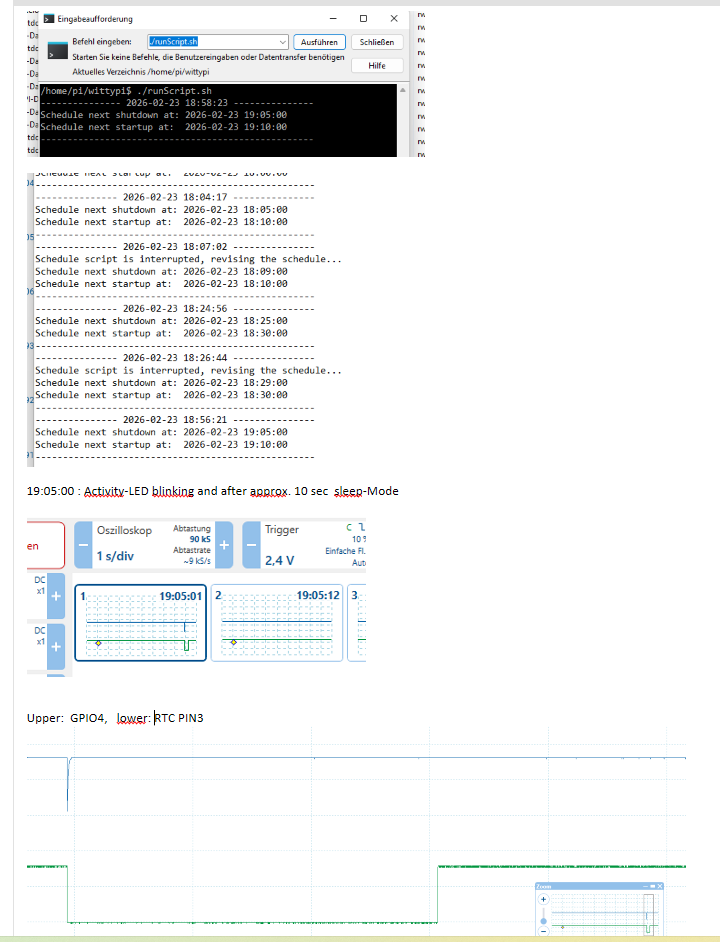
@nokellner the short pulling-down on GPIO-4 is a designed behavior in the firmware.
You may check the source code of firmware here: https://github.com/uugear/Witty-Pi-3/blob/master/Firmware/WittyPi3/WittyPi3.ino
The emulateButtonClick() function will be called when the RTC alarm is detected. For Witty Pi 3, it is impossible to know which kind of alarm (startup/shutdown) occurs until Raspberry Pi is up and read I2C registers in RTC, hence such button clicking emulation will perform everytime the alarm occurs. When RPi is running, such a short pulling-down will be captured by the software (daemon.sh) and shutdown command will then be executed. When RPi is off/booting, such pulling-down will be ignored.