

My Witty Pi 5 running firmware v1.6 fails I2C communication when powered through its USB-C port. i2cdetect -y 1 finds no devices, GPIO2/SDA reads low, and the kernel reports “SDA stuck at low.”
Removing the HAT restores SDA high. Another Witty Pi works correctly on the same Raspberry Pi with the same setup.
I soldered header pins to the GND, 1.1 V, and switch pads, but nothing is connected to them. Could you advise on further diagnostics?

Could you please check whether the Witty Pi 5 itself is still functioning?
To do this, please disconnect it from the Raspberry Pi and connect it to your computer using only a USB-C cable.
-
Does the white LED blink periodically?
-
Does the "Witty Pi 5" virtual USB drive appear on your computer?
-
Can you open the USB serial port with a terminal program (such as CoolTerm) and see the firmware log output?
-
When you press the ON/OFF button, does the white LED respond? Are the button press events recorded in the serial log?
Also, could you please provide a clear, close-up photo of the area where you soldered the header pins (GND, 1.1V and SWITCH)?
These details will help us narrow down the cause of the issue.
1. When plugged into the computer it blinks once every ~10 seconds. When plugged into a RaspberryPi it seems to blink twice, rapidly, roughly every ~10 seconds.
2. Yes, virtual USB drive appears on my computer and seems to take firmware updates.
3. Using PlatformIO, I'm able to firmware log output. For example, when I press the power button I see the following:
[01-12 00:05:35.013] Button Down
[01-12 00:05:35.127] Button Up
[01-12 00:05:35.128] Switch to STARTING state.
[01-12 00:05:35.128] Raspberry Pi is powered by Vusb (5202mV).
[01-12 00:05:35.129] No schedule script is found.
[01-12 00:06:05.123] Switch to ON state.
After a second click:
[01-12 00:06:40.423] Button Down
[01-12 00:06:40.551] Button Up
[01-12 00:06:40.551] Switch to STOPPING state.
[01-12 00:06:40.553] No schedule script is found.
[01-12 00:06:54.445] Cut Raspberry Pi's power.
[01-12 00:06:54.445] Switch to OFF state.
[01-12 00:06:54.445] Entering hibernation...
[01-12 00:06:54.446] Eject USB MSC device.
4. Yes the white light seems to respond when I push the power button and I see the push button event (as listed above).
5. Here is a picture of the solders (please don't judge 🙂 )
Lastly, I attached the log if that helps.
Thanks
Didn't seem to attach picture in the post. See attachment.
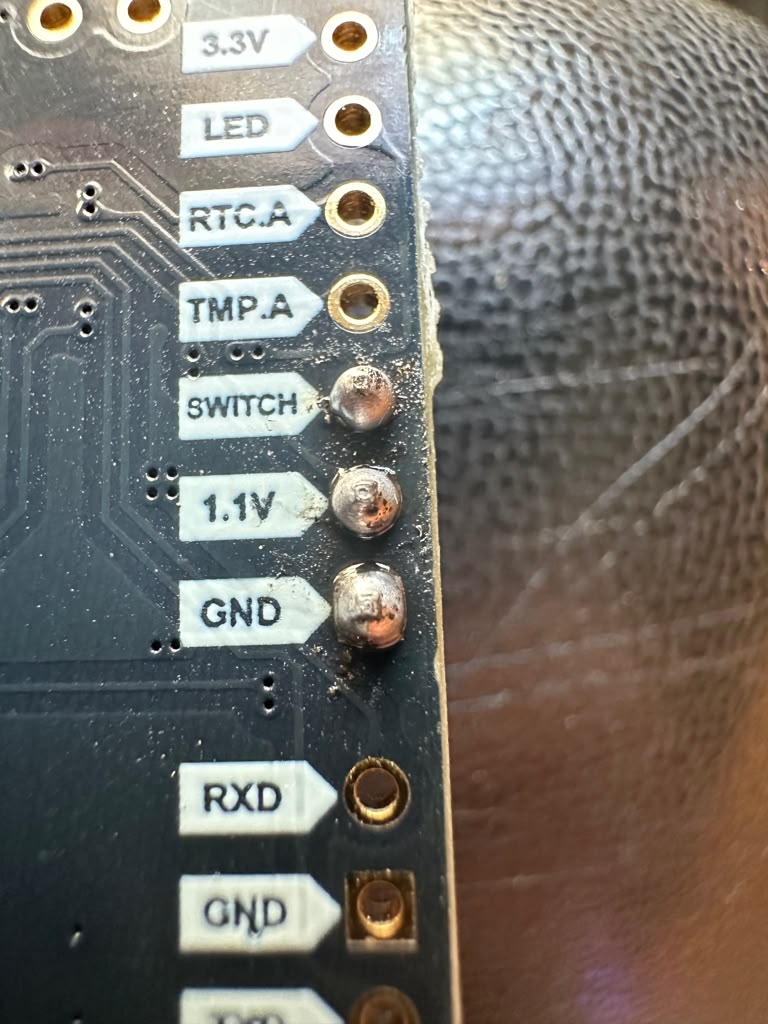
From the kernel logs I see this message: "[ 5.444914] i2c_designware 1f00074000.i2c: i2c_dw_handle_tx_abort: SDA stuck at low".
I also attached a push button to the switch and gnd pins and it seems to power up and down as expected when I push the button. I'm not using the 1.1v pin, I soldered it so I could use a 3 pin dupont connector with the 1.1v connector empty for stability, instead of having two single connectors which can slide off easily.
Well, I'm not quite sure what fixed it but one of the two seems to have fixed it.
1. Turning i2c interface off and back on in raspi-config.
2. (According to Claude) Trying a manual bus recovery while i2c interface is off.
for i in $(seq 9); do pinctrl set 3 op dl; pinctrl set 3 op dh; done
pinctrl set 3 a0
I'm no expert on I2C communications.. but here is the TL;DR of Claude's best guess.
The Witty Pi’s MCU was in the middle of sending a byte when the Pi reset. It stayed powered and kept holding SDA low, waiting for the next clock pulse. Because SDA never went high, the Pi’s driver thought the bus was busy and gave up.
The recovery loop fakes nine clock pulses on SCL: 8 data bits plus 1 ACK. That lets the MCU finish whatever byte it was stuck on and release SDA. Then the I2C controller gets the pin back and sees an idle bus.
It can happen again any time the Pi is interrupted mid-transaction. To prevent it, run the recovery at boot, or add a timeout in the firmware that resets the MCU’s I2C peripheral if SDA is held low with no clock for about 30 ms.
Well, I think I spoke too soon on that last one and it was something flaky. I see nothing on i2cdetect again. I will wait for next steps from you.
Your tests suggest that the Witty Pi 5's main functions are working normally. However, we still need to determine why I2C communication is failing.
Since you mentioned that another Witty Pi 5 works correctly on the same Raspberry Pi, could you please perform an A-B-A comparison?
-
Board A (problematic WP5): Completely disconnect power, install board A, power up, and run
i2cdetect -y 1. Record the result. -
Board B (working WP5): Completely disconnect power again, replace board A with board B, and repeat the test.
-
Board A again: Completely disconnect power, reinstall board A, and repeat the test.
Please keep everything else unchanged, including the Raspberry Pi, power supply, and software configuration. Do not change any I2C settings or run any bus recovery commands during these tests.
This will help us confirm whether the problem consistently follows that particular Witty Pi 5 board.
One additional note: you haven't mentioned which Raspberry Pi model you're using. If it is a Raspberry Pi 5, GPIO3 uses ALT3 for I2C1 SCL, not ALT0. Therefore, the command pinctrl set 3 a0 in your recovery sequence would not correctly restore the I2C pin configuration on a Raspberry Pi 5.
Let's first establish whether the problem is consistently associated with board A before investigating further.
You are correct in that I'm using a RaspberryPi 5.
1. (Problematic WP5)
0 1 2 3 4 5 6 7 8 9 a b c d e f
00: -- -- -- -- -- -- -- --
10: -- -- -- -- -- -- -- -- -- -- -- -- -- -- -- --
20: -- -- -- -- -- -- -- -- -- -- -- -- -- -- -- --
30: -- -- -- -- -- -- -- -- -- -- -- -- -- -- -- --
40: -- -- -- -- -- -- -- -- -- -- -- -- -- -- -- --
50: -- -- -- -- -- -- -- -- -- -- -- -- -- -- -- --
60: -- -- -- -- -- -- -- -- -- -- -- -- -- -- -- --
70: -- -- -- -- -- -- -- --
2. (Working WP5)
0 1 2 3 4 5 6 7 8 9 a b c d e f
00: -- -- -- -- -- -- -- --
10: -- -- -- -- -- -- -- -- -- -- -- -- -- -- -- --
20: -- -- -- -- -- -- -- -- -- -- -- -- -- -- -- --
30: -- -- -- -- -- -- -- -- -- -- -- -- -- -- -- --
40: -- -- -- -- -- -- -- -- -- -- -- -- -- -- -- --
50: -- 51 -- -- -- -- -- -- -- -- -- -- -- -- -- --
60: -- -- -- -- -- -- -- -- -- -- -- -- -- -- -- --
70: -- -- -- -- -- -- -- --
3. (Problematic WP5 again)
0 1 2 3 4 5 6 7 8 9 a b c d e f
00: -- -- -- -- -- -- -- --
10: -- -- -- -- -- -- -- -- -- -- -- -- -- -- -- --
20: -- -- -- -- -- -- -- -- -- -- -- -- -- -- -- --
30: -- -- -- -- -- -- -- -- -- -- -- -- -- -- -- --
40: -- -- -- -- -- -- -- -- -- -- -- -- -- -- -- --
50: -- -- -- -- -- -- -- -- -- -- -- -- -- -- -- --
60: -- -- -- -- -- -- -- -- -- -- -- -- -- -- -- --
70: -- -- -- -- -- -- -- --
From the kernel logs, I'm also seeing a message about, "lost arbitration" on i2c.
[ 14.633973] i2c_designware 1f00074000.i2c: i2c_dw_handle_tx_abort: lost arbitration
[ 14.645090] i2c_designware 1f00074000.i2c: i2c_dw_handle_tx_abort: SDA stuck at low
Thank you for performing the A-B-A test.
The results clearly show that the I2C communication problem consistently follows the same Witty Pi 5 board, while the other board works correctly on the same Raspberry Pi 5.
The kernel messages about "lost arbitration" and "SDA stuck at low" are consistent with an I2C bus issue, but they don't tell us exactly what is causing it.
Could you please help us confirm two more things?
-
Firmware version: Is the working Witty Pi 5 also running firmware v1.6, or is it using a different version?
-
GPIO status: With the problematic Witty Pi 5 installed and the I2C communication failing, please run:
pinctrl get 2 3Please share the output. This will help us check the pin configuration and signal levels of SDA and SCL.
At this point, we suspect an issue specific to that Witty Pi 5 board, but we would like to narrow it down a little further before drawing a conclusion.
1. They are both running the same exact v1.6 firmware. I re-flashed both of them using the same .uf2 firmware file with no config changes to ensure they were running identical firmware.
2. $ pinctrl get 2,3
2: a3 pu | lo // GPIO2 = SDA1
3: a3 pu | hi // GPIO3 = SCL1
Hello, just wanted to follow up on this. Are we concluding that the board is bad? Or do you recommend any other tests?
The results confirm that the I2C communication problem consistently follows one particular Witty Pi 5 board, even though both boards are running the same firmware and the Raspberry Pi's I2C pins are correctly configured.
The problematic board appears to be functioning normally in other respects, so the issue seems to be limited to its I2C interface.
However, we cannot determine from the available information whether this is caused by a hardware defect or an abnormal state of the RP2350's I2C peripheral. The fact that you were able to restore communication temporarily suggests that the issue may be recoverable, but we don't have enough evidence to confirm the cause or identify a reliable fix.
Unfortunately, we cannot draw any further conclusions from the current test results.
Ok, I understand, thank you for your help and support. I will reach out to the website I purchased it from for either a possible replacement or refund. Thanks! You can close this ticket.